Robust Formant Tracking with FormantPath
Source:vignettes/formantpath-robust-tracking.Rmd
formantpath-robust-tracking.RmdIntroduction
FormantPath is Praat’s advanced formant tracking algorithm that tests multiple formant ceiling values and automatically selects the optimal tracking path. This approach is particularly valuable when:
- Speaker characteristics are unknown (male vs female vs child)
- Audio quality is poor or contains noise
- Standard formant tracking produces spurious values
- You need maximum robustness across diverse speakers
Unlike standard formant extraction (
to_formant_burg( )), FormantPath generates multiple
candidate formant tracks with different ceiling frequencies, then uses
statistical criteria to select the best path frame-by-frame.
Why Use FormantPath?
The Ceiling Frequency Problem
Formant tracking quality depends heavily on choosing the right formant ceiling - the maximum frequency for formant detection:
- Too low (e.g., 5000 Hz for female speaker): Misses F3, tracks harmonics as formants
- Too high (e.g., 6500 Hz for male speaker): Detects spurious formants, poor F1/F2 accuracy
- Just right: Accurate F1/F2/F3 tracking with minimal errors
FormantPath solves this by testing multiple ceilings automatically.
Standard vs FormantPath Comparison
# Load example audio
sound <- Sound(system.file("extdata", "test.wav", package = "pladdrr"))

# Standard method (single ceiling) - with error handling
formant_standard <- tryCatch({
  sound$to_formant_burg(
    time_step = 0.005,
    max_formants = 5,
    max_frequency = 5500,
    window_length = 0.025,
    pre_emphasis_from = 50
  )
}, error = function(e) {
  message("Standard formant extraction failed: ", e$message)
  NULL
})

# FormantPath (multiple ceilings) - with error handling
formant_path <- tryCatch({
  sound$to_formant_path(
    time_step = 0.005,
    max_num_formants = 5,
    formant_ceiling = 5500,
    num_steps_up_down = 2L  # Test 5 ceilings: ±10% around 5500 Hz
  )
}, error = function(e) {
  message("FormantPath extraction failed: ", e$message)
  NULL
})

if (!is.null(formant_standard) && !is.null(formant_path)) {
  # Extract optimal formant from path
  formant_optimal <- formant_path$extract_formant()

  cat("Standard method: 1 ceiling (5500 Hz)\n")
  cat("FormantPath: ", formant_path$get_number_of_candidates(),
      " ceilings tested\n", sep = "")
  cat("Ceiling range: ",
      round(min(formant_path$get_all_ceiling_frequencies())), " - ",
      round(max(formant_path$get_all_ceiling_frequencies())), " Hz\n", sep = "")
} else {
  cat("Note: Formant extraction requires readable audio input.\n")
  cat("Check that inst/extdata/test.wav is present and readable.\n")
}
#> Standard method: 1 ceiling (5500 Hz)
#> FormantPath: 5 ceilings tested
#> Ceiling range: 4977 - 6078 Hz
Basic Usage
Creating a FormantPath
The key parameter is num_steps_up_down - how many
ceiling values to test above and below the center:
# Test 3 ceilings (±5% around 5500 Hz)
fp <- sound$to_formant_path(
  time_step = 0.005,
  max_num_formants = 5,
  formant_ceiling = 5500,           # Center frequency
  ceiling_step_fraction = 0.05,     # ±5% steps
  num_steps_up_down = 1L            # 1 step up, 1 down = 3 total
)

cat("Created FormantPath with:\n")
#> Created FormantPath with:
cat("  Duration:", fp$get_duration(), "seconds\n")
#>   Duration: 1 seconds
cat("  Frames:", fp$get_nx(), "\n")
#>   Frames: 190
cat("  Candidates:", fp$get_number_of_candidates(), "\n")
#>   Candidates: 3
cat("  Ceilings tested:",
    toString(round(fp$get_all_ceiling_frequencies())),
    "Hz\n")
#> Ceilings tested: 5232, 5500, 5782 HzQuerying FormantPath
Inspecting Candidates
fp <- sound$to_formant_path(num_steps_up_down = 2L)

# Get all tested ceilings
ceilings <- fp$get_all_ceiling_frequencies()
cat("Tested ceilings (Hz):\n")
#> Tested ceilings (Hz):
print(round(ceilings))
#> [1] 4977 5232 5500 5782 6078

# Check which candidate was chosen in middle frame
mid_frame <- fp$get_nx() %/% 2
chosen_candidate <- fp$get_candidate_in_frame(mid_frame)
chosen_ceiling <- fp$get_ceiling_frequency(chosen_candidate)

cat("\nAt frame", mid_frame, "(mid-point):\n")
#>
#> At frame 95 (mid-point):
cat("  Chosen candidate:", chosen_candidate, "\n")
#>   Chosen candidate: 3
cat("  Ceiling:", round(chosen_ceiling), "Hz\n")
#>   Ceiling: 5500 Hz
Stress Values (Quality Metric)
Each candidate has a “stress” value - lower is better:
fp <- sound$to_formant_path(num_steps_up_down = 2L)

# Calculate stress for each candidate
n_candidates <- fp$get_number_of_candidates()
stresses <- vapply(1:n_candidates, function(i) {
  fp$get_stress_of_candidate(
    candidate = i,
    parameters = c(1, 1, 1, 1, 1),  # Equal weights
    powerf = 1.25
  )
}, numeric(1))

# Find best candidate
best_idx <- which.min(stresses)
cat("Stress by candidate:\n")
#> Stress by candidate:
print(data.frame(
  Candidate = 1:n_candidates,
  Ceiling = round(fp$get_all_ceiling_frequencies()),
  Stress = round(stresses, 4)
))
#>   Candidate Ceiling Stress
#> 1         1    4977 5.8956
#> 2         2    5232 3.9507
#> 3         3    5500 3.7211
#> 4         4    5782 3.0112
#> 5         5    6078 2.9142
cat("\nLowest stress: Candidate", best_idx,
    "(", round(fp$get_ceiling_frequency(best_idx)), "Hz )\n")
#>
#> Lowest stress: Candidate 5 ( 6078 Hz )
Extracting the Optimal Formant
Automatic Extraction
fp <- sound$to_formant_path(num_steps_up_down = 2L)

# Extract the automatically selected optimal path
frm_result <- fp$extract_formant()

cat("Extracted formant:\n")
#> Extracted formant:
cat("  Duration:", sound$get_duration(), "seconds\n")
#>   Duration: 1 seconds
cat("  Frames:", frm_result$get_number_of_frames(), "\n")
#>   Frames: 190

# Query formant values
mid_time <- sound$get_duration() / 2
f1 <- frm_result$get_value_at_time(1, mid_time, "hertz")
f2 <- frm_result$get_value_at_time(2, mid_time, "hertz")
f3 <- frm_result$get_value_at_time(3, mid_time, "hertz")

cat("\nFormants at midpoint (", round(mid_time, 3), "s):\n", sep = "")
#>
#> Formants at midpoint (0.5s):
cat("  F1:", round(f1), "Hz\n")
#>   F1: 421 Hz
cat("  F2:", round(f2), "Hz\n")
#>   F2: 465 Hz
cat("  F3:", round(f3), "Hz\n")
#>   F3: 2998 Hz
Manual Path Selection
set_path() and set_optimal_path() let you
override the automatically selected candidate for a time range:
# Set candidate 3 for time range 0.2-0.4s
fp$set_path(tmin = 0.2, tmax = 0.4, selected_candidate = 3)

# Or set optimal path for entire duration
fp$set_optimal_path(
  tmin = fp$get_xmin(),
  tmax = fp$get_xmax(),
  parameters = c(1, 1, 1, 1, 1),
  powerf = 1.25
)

# Then extract
frm_result <- fp$extract_formant()
Visualizing FormantPath Results
Comparing All Candidates
fp <- sound$to_formant_path(num_steps_up_down = 2L)

# Export optimal formant track
df <- fp$as_data_frame()

# Plot F1 and F2
df_plot <- df[df$formant %in% 1:2, ]
df_plot$formant_num <- df_plot$formant

ggplot(df_plot, aes(time, frequency, color = factor(formant_num))) +
  geom_line(alpha = 0.7, linewidth = 1) +
  scale_color_manual(
    values = c("1" = "#E41A1C", "2" = "#377EB8"),
    labels = c("F1", "F2")
  ) +
  labs(
    title = "FormantPath: Optimal Formant Track",
    subtitle = paste("Selected from", fp$get_number_of_candidates(),
      "ceiling frequency candidates"),
    x = "Time (s)",
    y = "Frequency (Hz)",
    color = "Formant"
  ) +
  theme_minimal() +
  theme(legend.position = "top")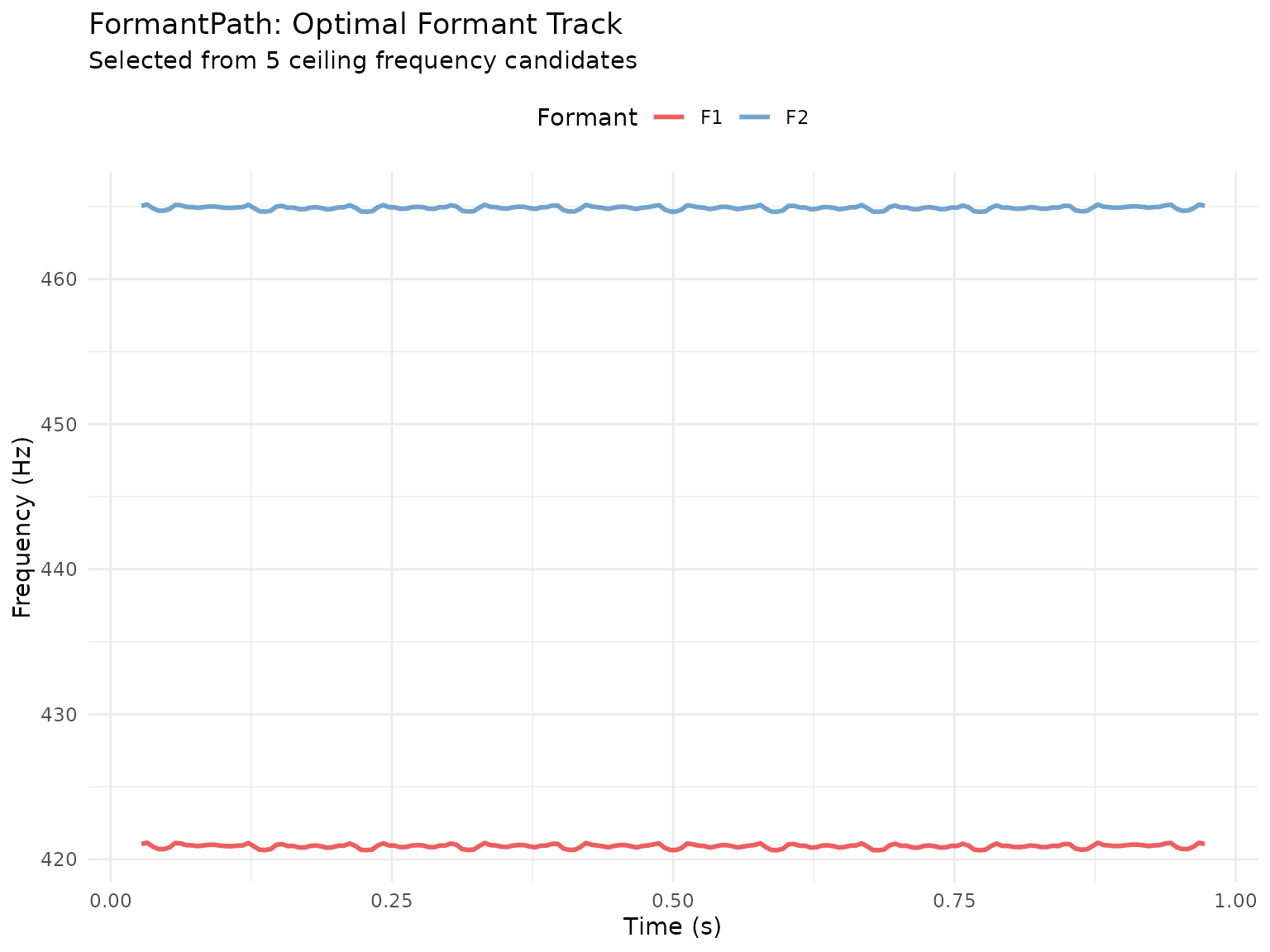
Optimal Path vs Standard
# Get optimal formant from FormantPath
fp <- sound$to_formant_path(num_steps_up_down = 2L)
formant_optimal <- fp$extract_formant()
df_optimal <- as.data.frame(formant_optimal)
df_optimal$method <- "FormantPath (Optimal)"

# Standard single-ceiling with full parameters
formant_standard <- sound$to_formant_burg(
  time_step = 0.005,
  max_formants = 5,
  max_frequency = 5500,
  window_length = 0.025,
  pre_emphasis_from = 50
)
df_standard <- as.data.frame(formant_standard)
df_standard$method <- "Standard (5500 Hz)"

# Combine and plot
combined_df <- rbind(df_optimal, df_standard)
combined_df <- combined_df[combined_df$formant %in% 1:3, ]
ggplot(combined_df, aes(time, frequency, color = method)) +
  geom_line(alpha = 0.7, linewidth = 0.8) +
  facet_wrap(~ paste0("F", formant), ncol = 1, scales = "free_y") +
  scale_color_manual(values = c(
    "FormantPath (Optimal)" = "#E41A1C",
    "Standard (5500 Hz)" = "#377EB8"
  )) +
  labs(
    title = "FormantPath vs Standard Formant Tracking",
    x = "Time (s)",
    y = "Frequency (Hz)",
    color = "Method"
  ) +
  theme_minimal() +
  theme(legend.position = "top")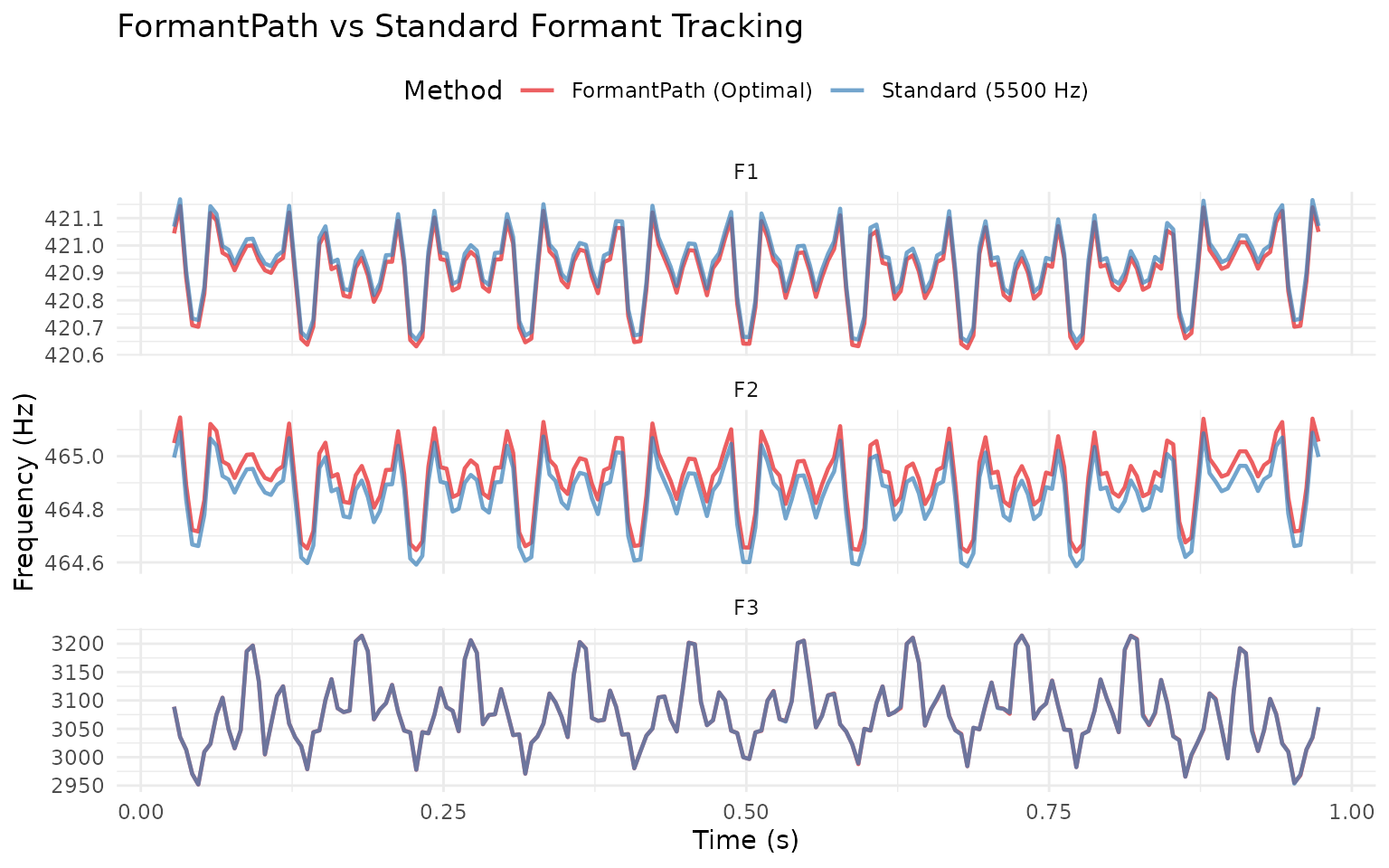
Advanced Path Finding
Viterbi-Style Path Optimization
FormantPath can use a Viterbi-like algorithm to find the globally optimal path:
fp <- sound$to_formant_path(num_steps_up_down = 3L)

# Find optimal path with custom weights
fp$path_finder(
  q_weight = 1.0,                        # Formant quality
  frequency_change_weight = 1.0,         # Smoothness penalty
  stress_weight = 1.0,                   # Model fit
  ceiling_change_weight = 1.0,           # Consistency bonus
  intensity_modulation_step_size = 5.0,
  window_length = 0.025,
  parameters = c(1, 1, 1, 1, 1),
  powerf = 1.25
)

frm_result <- fp$extract_formant()
Weight meanings:
-
q_weight: Prefer higher formant quality scores -
frequency_change_weight: Penalize large formant jumps -
stress_weight: Prefer lower stress (better model fit) -
ceiling_change_weight: Prefer consistent ceiling choice
Use Cases
1. Unknown Speaker Demographics
When you don’t know if the speaker is male, female, or child:
# Test wide range of ceilings
fp <- sound$to_formant_path(
  formant_ceiling = 5500,      # Middle ground
  ceiling_step_fraction = 0.10, # ±10% steps (wider range)
  num_steps_up_down = 3L       # 7 candidates: 4500-6800 Hz
)

ceilings <- fp$get_all_ceiling_frequencies()
cat("Testing range:", round(min(ceilings)), "-",
    round(max(ceilings)), "Hz\n")
#> Testing range: 4075 - 7424 Hz
cat("Covers: Male (5000), Female (5500), Child (6500+)\n")
#> Covers: Male (5000), Female (5500), Child (6500+)

frm_result <- fp$extract_formant()
2. Noisy or Difficult Audio
For poor quality audio, use more candidates and tighter steps:
fp <- sound$to_formant_path(
  formant_ceiling = 5500,
  ceiling_step_fraction = 0.05,  # Finer steps
  num_steps_up_down = 4L,        # More candidates (9 total)
  window_length = 0.030          # Longer window for stability
)

cat("Using", fp$get_number_of_candidates(), "candidates for robustness\n")
#> Using 9 candidates for robustness
3. Segment-Specific Analysis
Compare formants across time-aligned segments using a TextGrid:
textgrid <- TextGrid(
  system.file("extdata", "test.TextGrid", package = "pladdrr"))

# Get labelled intervals from the phone tier
intervals <- textgrid$get_all_intervals("phones")
intervals <- intervals[intervals$text != "", ]

# test.TextGrid spans 3s but test.wav is only 1s - clip segment
# boundaries to the sound's actual duration before extracting
intervals$end <- pmin(intervals$end, sound$get_duration())
intervals <- intervals[intervals$start < intervals$end, ]

# Analyze each segment with FormantPath
results <- lapply(seq_len(nrow(intervals)), function(i) {
  seg <- intervals[i, ]
  segment_sound <- sound$extract_part(seg$start, seg$end)

  fp <- segment_sound$to_formant_path(num_steps_up_down = 2L)
  frm_result <- fp$extract_formant()

  df <- as.data.frame(frm_result)
  data.frame(
    phone = seg$text,
    f1 = mean(df$frequency[df$formant == 1], na.rm = TRUE),
    f2 = mean(df$frequency[df$formant == 2], na.rm = TRUE)
  )
})

phone_formants <- do.call(rbind, results)
print(phone_formants)
#>   phone       f1       f2
#> 1     h 420.9057 464.9144
#> 2     ɛ 420.9347 464.9425
4. Batch Processing Multiple Files
# Process multiple recordings with unknown speaker characteristics.
# Replace `files` with your own vector of file paths; here we reuse the
# bundled example file to show the pattern.
files <- rep(system.file("extdata", "test.wav", package = "pladdrr"), 3)

formants <- lapply(files, function(file) {
  sound <- Sound(file)
  fp <- sound$to_formant_path(
    formant_ceiling = 5500,
    num_steps_up_down = 2L
  )
  fp$extract_formant()
})

names(formants) <- files
Performance Considerations
Memory Usage
FormantPath stores multiple formant candidates:
# 5 candidates = 5× the memory of standard Formant
fp <- sound$to_formant_path(num_steps_up_down = 2L)  # 5 candidates
# Memory ≈ 5 × size of single Formant objectTips: - Use fewer candidates for long files
(num_steps_up_down = 1) - Extract and discard FormantPath
after getting optimal Formant - Process files individually rather than
loading all in memory
Computation Cost
FormantPath fits num_candidates formant tracks per call
instead of one, so expect its cost to scale roughly with the number of
candidates requested. Measure on your own data:
system.time(frm_result <- sound$to_formant_burg())
#>    user  system elapsed
#>   0.013   0.002   0.006
system.time(fp <- sound$to_formant_path(num_steps_up_down = 2L))
#>    user  system elapsed
#>   0.061   0.000   0.025
Best Practices
DO
Use FormantPath when speaker characteristics are unknown
Start with
num_steps_up_down = 2(5 candidates) as default-
Extract the formant immediately to save memory:
frm_result <- sound$to_formant_path(num_steps_up_down = 2L)$extract_formant() Compare candidates visually when results look suspicious
Use wider step fractions (0.10) for diverse speakers
Document which method you used for reproducibility
DON’T
- Don’t use FormantPath for all analyses - use the standard method when the speaker’s formant range is already known
-
Don’t use too many candidates
(
num_steps_up_down > 4) unless necessary - Don’t forget to extract - FormantPath itself isn’t directly usable
- Don’t assume optimal = perfect - always inspect difficult cases
- Don’t ignore stress values - high stress indicates poor fit
Comparison with Other Tools
pladdrr FormantPath vs Praat
pladdrr provides direct R access to Praat’s FormantPath algorithm:
| Feature | pladdrr | Praat GUI |
|---|---|---|
| Multiple candidates | Yes | Yes |
| Automatic path selection | Yes | Yes |
| Manual path override | Yes, but see the known crash noted above | Yes |
| Data export | Yes (data.frame) | Yes (text file) |
| Batch processing | Yes (R loops) | No (manual) |
| Visualization | Yes (ggplot2) | Yes (built-in) |
Troubleshooting
Issue: All candidates look similar
Cause: Step fraction too small or range too narrow
Solution: Increase
ceiling_step_fraction to 0.10 or higher
# Instead of this (too narrow)
fp <- sound$to_formant_path(
  formant_ceiling = 5500,
  ceiling_step_fraction = 0.02,  # ±2% only
  num_steps_up_down = 2L
)

# Use this (better range)
fp <- sound$to_formant_path(
  formant_ceiling = 5500,
  ceiling_step_fraction = 0.10,  # ±10%
  num_steps_up_down = 2L
)Summary
FormantPath is ideal when: - Speaker demographics unknown - Audio quality is poor - Need maximum robustness - Comparing diverse speakers
Use standard formant extraction when: - Speaker type is known (male/female) - Audio quality is good - Speed is critical - Memory is limited
Key Parameters: - formant_ceiling:
Center frequency (5000-5500 for adults) -
num_steps_up_down: 1-2 for most cases, 3-4 for difficult
audio - ceiling_step_fraction: 0.05 (narrow) to 0.10
(wide)
Further Reading
- Praat manual: FormantPath
- Weenink, D. ( 2015). “Improved formant frequency measurements of short segments”
- pladdrr documentation:
?to_formant_path
Session Info
sessionInfo()
#> R version 4.6.1 (2026-06-24)
#> Platform: x86_64-pc-linux-gnu
#> Running under: Ubuntu 24.04.5 LTS
#>
#> Matrix products: default
#> BLAS:   /usr/lib/x86_64-linux-gnu/openblas-pthread/libblas.so.3
#> LAPACK: /usr/lib/x86_64-linux-gnu/openblas-pthread/libopenblasp-r0.3.26.so;  LAPACK version 3.12.0
#>
#> locale:
#>  [1] LC_CTYPE=C.UTF-8       LC_NUMERIC=C           LC_TIME=C.UTF-8
#>  [4] LC_COLLATE=C.UTF-8     LC_MONETARY=C.UTF-8    LC_MESSAGES=C.UTF-8
#>  [7] LC_PAPER=C.UTF-8       LC_NAME=C              LC_ADDRESS=C
#> [10] LC_TELEPHONE=C         LC_MEASUREMENT=C.UTF-8 LC_IDENTIFICATION=C
#>
#> time zone: UTC
#> tzcode source: system (glibc)
#>
#> attached base packages:
#> [1] stats     graphics  grDevices utils     datasets  methods   base
#>
#> other attached packages:
#> [1] ggplot2_4.0.3 pladdrr_5.0.6
#>
#> loaded via a namespace (and not attached):
#>  [1] gtable_0.3.6        jsonlite_2.0.0      dplyr_1.2.1
#>  [4] compiler_4.6.1      tidyselect_1.2.1    Rcpp_1.1.2
#>  [7] jquerylib_0.1.4     systemfonts_1.3.2   scales_1.4.0
#> [10] textshaping_1.0.5   yaml_2.3.12         fastmap_1.2.0
#> [13] R6_2.6.1            labeling_0.4.3      generics_0.1.4
#> [16] knitr_1.52          tibble_3.3.1        desc_1.4.3
#> [19] bslib_0.12.0        pillar_1.11.1       RColorBrewer_1.1-3
#> [22] rlang_1.3.0         cachem_1.1.0        xfun_0.62
#> [25] fs_2.1.0            sass_0.4.10         S7_0.2.2
#> [28] otel_0.2.0          cli_3.6.6           pkgdown_2.2.1
#> [31] withr_3.0.3         magrittr_2.0.5      digest_0.6.39
#> [34] grid_4.6.1          lifecycle_1.0.5     vctrs_0.7.3
#> [37] evaluate_1.0.5      glue_1.8.1          data.table_1.18.6.1
#> [40] farver_2.1.2        codetools_0.2-20    ragg_1.5.2
#> [43] rmarkdown_2.32      tools_4.6.1         pkgconfig_2.0.3
#> [46] htmltools_0.5.9